Browser games · No installation neededLoading help →
Puzzle games

Goods Master

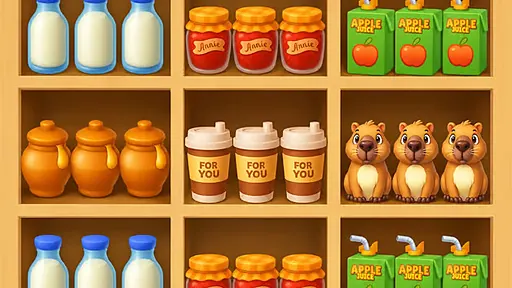
Move jars, bottles and boxes between shelf slots, making matching sets before the move limit runs out.

Ready — press Play
Goods Master game artwork

The game loads after you press Play.

Click inside the player before using keyboard controls.Loading help →
Controls & keys
  • Tap or click an item: Pick up a good.
  • Tap or click an empty shelf slot: Place the picked-up good.
  • Tap booster icons: Activate shuffle, transform, or merge tools.

About Goods Master

Goods Master is a sorting puzzle with a move budget. Pick up jars, bottles or boxes and place them in shelf slots so a shelf holds a matching set. Completing a shelf clears it and makes room for more goods. The important resource is not just space, but the number of moves left.

Choose a set to finish

Look for a shelf that is close to complete and count the moves needed to finish it. A useful clear should open room or reduce the number of items you still need to rearrange. Moving a good back and forth can spend the budget without improving the board.

Use a booster for a specific problem

The available tools include shuffling, transforming a good and merging with a hammer. Check what is blocking progress before selecting one. A booster is most useful when you can explain which stuck set or crowded area it will resolve.

Your first attempt

How to play Goods Master

To begin playing Goods Master, simply tap or click on any scattered item to pick it up. Next, select an empty slot on a shelf where you wish to place it. Your goal is to fill an entire shelf with three identical goods, which will then clear that shelf. Keep an eye on your remaining moves, as they are limited per level. If you find yourself stuck, tap the booster icons located at the bottom of the screen to shuffle the current items, transform a good into a different type, or use the hammer tool to merge items.

Make the next run count

Goods Master tips

  1. Prioritize clearing shelves quickly to free up space for new items.
  2. Look for opportunities to create multiple matching sets in sequence for efficient clearing.
  3. Save boosters for truly challenging situations when you're running low on moves or options.
  4. Plan several moves ahead to avoid getting stuck with no available matching slots.
Quick answers

Goods Master FAQ

What is the main objective in Goods Master?

The main objective is to sort scattered goods like jars, bottles, and boxes onto shelves, ensuring each shelf holds a complete set of matching items to clear it.

How do I clear a shelf in Goods Master?

You clear a shelf by filling all its slots with three identical goods. Once a shelf is full of matching items, it will automatically clear away.

Are there tools to help if I get stuck?

Yes, Goods Master provides boosters such as shuffling all items, transforming one good into another, or using a hammer tool to merge items when you need help.