Browser games · No installation neededLoading help →
Puzzle games

Crossmath Challenge

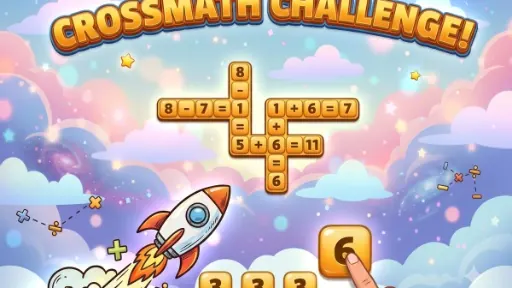
Place number tiles in a crossword-style grid so the equations work both across and down.

Ready — press Play
Crossmath Challenge game artwork

The game loads after you press Play.

Click inside the player before using keyboard controls.Loading help →
Controls & keys
  • Tap or click a tile: Select a tile from the tray.
  • Tap an empty cell: Place the selected tile.
  • Drag a tile: Place directly onto a cell.
  • Undo button: Remove the last placed tile.
  • Shuffle button: Reorder tiles in the tray.
  • Hint button: Auto-fill one cell (limited use).

About Crossmath Challenge

Crossmath Challenge turns a crossword grid into connected equations. Select a tile from the tray and place it in an empty cell, or drag it directly into position. A number needs to fit the arithmetic in both directions where the rows and columns intersect.

Check the crossing equation

A tile can make one line look correct while breaking the line that crosses it. Before settling on a value, read the full equation across and down. Start with a position where the surrounding values give you a clear constraint.

Use Undo to test a focused change

Undo removes the last placement, Shuffle rearranges the tray and the limited-use Hint fills a cell. Rearranging the tray does not solve an arithmetic conflict by itself, so return to the equation that needs attention before spending a hint.

Your first attempt

How to play Crossmath Challenge

To begin, observe the empty crossword-style grid and the available tiles in your tray. Select a tile by tapping or clicking it, then tap an empty cell in the grid to place it. Alternatively, you can drag a tile directly from the tray onto a desired cell. Your goal is to complete all horizontal and vertical equations correctly. Use the "Undo" button to reverse your last move, "Shuffle" to reorder your tray tiles, or a limited "Hint" to automatically fill a cell if you get stuck.

Make the next run count

Crossmath Challenge tips

  1. Start with equations that have fewer unknown variables to narrow down possibilities.
  2. Pay attention to both horizontal and vertical equations simultaneously when placing a tile.
  3. Use the Shuffle option if your current tile arrangement feels unhelpful or overwhelming.
  4. Save your limited Hints for truly challenging spots rather than early in a puzzle.
  5. Double-check your arithmetic before confirming placements, especially with operators.
Quick answers

Crossmath Challenge FAQ

What kind of game is Crossmath Challenge?

Crossmath Challenge is a fast-paced number puzzle game that combines arithmetic and logic, where players complete math equations in a crossword-style grid.

How do I place tiles in the grid?

You can tap a tile from the tray and then tap an empty grid cell, or simply drag a tile directly from the tray onto the desired cell.

What if I make a mistake or get stuck?

You can tap the "Undo" button to reverse your last move. If you're stuck, a limited "Hint" option is available to auto-fill a cell.