Browser games · No installation neededLoading help →
Sports games

Fiva 26: Soccer

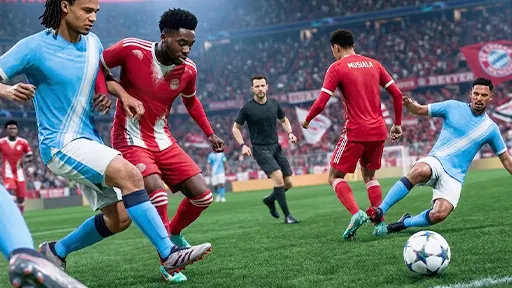
Choose a country, aim passes, sprint into space, and use match rewards to develop your squad and unlock football cosmetics.

Ready — press Play
Fiva 26: Soccer game artwork

The game loads after you press Play.

Click inside the player before using keyboard controls.Loading help →
Controls & keys
  • Desktop: WASD or arrow keys move; Shift sprints.
  • Hold the pass button to aim at a teammate and release it to pass.
  • Click the shoot button to strike.
  • Mobile: Left joystick moves; on-screen buttons handle sprinting, passing, and shooting.

About Fiva 26: Soccer

Short football matches make Fiva 26: Soccer a game of quick decisions with the ball. The pass control is especially useful to learn: hold it to aim at a teammate and release it to pass. Sprinting and shooting give you the other basic tools for building an attack.

Winning earns coins for kits, player skins, and team upgrades, while trophy ranks provide a longer-term target. Daily quests and login rewards offer additional goals. Begin with simple passes and a clear route toward goal; understanding those actions will help more than buying a new look before you know how the team responds.
Your first attempt

How to play Fiva 26: Soccer

Choose your country and squad. Learn to move and sprint, hold the pass button to select a teammate, release to send the ball, and use the shoot button when you have a clear opportunity.

Make the next run count

Fiva 26: Soccer tips

  1. Aim the pass before releasing rather than tapping it without checking the teammate.
  2. Use sprint to reach open space, then reassess whether to pass or shoot.
  3. Read the team-upgrade options before spending coins intended to improve the squad.
Quick answers

Fiva 26: Soccer FAQ

How are passes aimed?

Hold the pass button to aim at a teammate, then release it.

What are coins used for?

Match rewards can unlock kits and player skins and fund team upgrades.